So, you’ve got an email campaign in the works? Awesome! Email design can either make your content shine or land in the dreaded spam folder. I remember trying to create a newsletter once, and let’s just say, my ‘creative’ design looked like a toddler doodled on it. Yikes! Luckily, with the right concepts and some humor sprinkled in, you can captivate your audience and keep them scrolling. Whether it’s adding a snazzy preheader or crafting a footer that doesn’t scream ‘I give up!’, this article dives into those little touches that refresh your email game. Trust me, good design isn’t just fluff; it conveys your brand’s personality and keeps your readers coming back for more. Grab your coffee (or tea, no judgment) and let’s get this design party started!
Key Takeaways
- Crafting an inviting preheader can boost open rates dramatically.
- Footers aren’t just an afterthought; they can include essential info.
- An engaging email signature can leave a lasting impression.
- Don’t underestimate the power of effective newsletter designs.
- Remember, humor can be a great connector in your email content.
Now let’s discuss the art of email design and how to make your messages stand out like a unicorn at a dog show. Effective designs don’t need to be glued together with the latest technology; they just need to convey your message with a sprinkling of creativity and a dash of charm.
Inspiring Email Design Concepts
We’ll explore some design ideas that not only make your emails pop but also transform your marketing strategies—think of it like dressing your great-aunt’s fruitcake in Gucci!
Minimalist Magic
Let’s kick things off with the minimalist approach. It’s like eating a salad after a week of pizzas—pure, fresh, and focused!
Consider StudioSuits. Their emails are like a clean white canvas, showcasing their offerings with sharp product images and concise descriptions. You can almost hear the angels sing every time a new suit collection drops, easing your decision-making like a Sunday morning.
Take a peek at their latest collection of green suits. Notice how the clarity allows readers to shop without feeling like they’ve wandered into a labyrinth.
Another great example is Fellow. Their emails radiate simplicity with just enough white space and bold text to make it feel like an exclusive coffee shop vibe—no distracting images or unnecessary fluff.
Check out Fellow’s AI Biweekly Recap to see how they woo their audience without the razzle-dazzle. This approach really sharpens focus.
What This Means for Your Metrics:
- Click-through rates often improve because readers are guided towards a single call-to-action—like a sign pointing to a free donut!
- Conversion rates can rise due to fewer distractions. It’s simple: too many choices can feel like being at a buffet without a plate.
- Open rates may not soar because of design, but a catchy minimalist subject line can enhance trust.
Color That Pops
Next on our list? Colorful designs! These emails are like fireworks in a dull sky—perfect for grabbing attention and reflecting your brand’s personality.
For instance, Headspace does a fantastic job with vibrant welcome emails, making users feel like they’ve just stumbled into a carnival for their minds. You can bet these emails help keep the excitement rolling!
How This Connects to Your Metrics:
- Open rates may see a boost thanks to engaging and lively subject lines that spark curiosity.
- Click-through rates can increase when the visuals pull readers towards action, turning curiosity into clicks!
- Conversion rates fluctuate, but energetic designs can either energize or overwhelm. Balance is key!
Customer-Centric Approach
Let’s not forget customer-centric designs. These beauties help people feel seen, much like a good friend who knows your coffee order by heart.
Take emfluence’s nurture email, which directly speaks to the recipient’s specific needs. It’s like giving a personalized gift—who wouldn’t feel special?
Impact on Your Metrics:
- Open rates can skyrocket with relatable, personalized subject lines.
- Click-through rates typically increase when the content resonates with user preferences.
- Conversion rates improve as loyalty grows, thanks to that warm fuzzy feeling of recognition!
Get Creative!
Last but not least, let’s get creative! Think storytelling combined with vibrant visuals, like a Fort Knox of excitement!
For example, scrapbook-styled emails are on-trend and give off a cozy vibe that feels crafty and inviting. Canva’s got some stellar examples that infuse personality and originality into emails.
Impact on Your Metrics:
- Conversion rates rise when creativity aligns with your message, adding a human touch.
- Open rates get a lift if your subject line teases a story that piques curiosity.
- Click-through rates may soar if the creative layout invites exploration—keeping readers engaged!
Now, we’re going to talk about how crucial the email preheader is in grabbing attention and setting the mood for your campaign. It’s like the appetizer before the main course at a fancy restaurant—just a hint that leaves folks hungry for more!
The Art of Crafting an Eye-Catching Preheader
Think of the preheader as the charming sidekick to your email subject line. It shouldn’t try to steal the show, but rather, complement it.
Picture this: you’re scrolling through your inbox, and a preheader catches your eye like a bright red sports car in a sea of beige sedans.
It doesn’t have to spill all the beans, but it should whet the appetite for what’s to come.
Let’s explore some stellar preheader examples that really shine:
- Company X offers unbeatable discounts for the weekend!
- Don’t miss out on this unique opportunity!
These snippets of text are like a friendly nudge, inviting the reader to take a closer look. They cleverly hint at exciting content within, making subscribers think, “Oh boy, what’s going on here?”
Take Company Y—it uses a bright, engaging background and emphasizes its message with bold typography and delightful calls-to-action (CTAs). No one wants to feel like they’re reading fine print after clicking open, right?
They want that ‘aha!’ moment as soon as they open the email.
Other examples, like the vivid style of Company Z, blend fun phrases with striking visuals to create a memorable experience. And who doesn’t want to be remembered as the life of the email party?
Design Reminders:
- Choose a background color that feels true to your brand’s vibe.
- Craft a message that sparks curiosity and encourages scrolling.
- Incorporate your logo and branding to keep everything cohesive.
In the end, captivating your audience right off the bat is key to effective email marketing. Think of the preheader as your golden ticket—it opens the door to engaging conversations and piques interest faster than a hot knife through butter!
When done right, those few characters can elevate your email’s performance, engaging readers just like a blockbuster trailer that keeps them on the edge of their seats waiting for the premiere.
Next, we are going to talk about how the footer in an email or webpage serves as the finishing touch. It’s like the sprinkles on a cupcake—optional, but it makes everything sweeter!
The footer is your grand finale. It’s not just about looking good; it’s about delivering essential info like contact details, social media links, and those pesky legal notices we all love.
(Yes, and the beloved unsubscribe button—it’s like saying, “Hey, no hard feelings!”)
For a glimpse into footer brilliance, let’s take cues from Supergoop and Polestar.
Supergoop’s footer is like a party invitation—informative yet inviting. It features quick links for free shipping, rewards, and quizzes. Talk about getting everyone’s attention without the formalities!
In contrast, Polestar’s approach is more like a stiff upper lip at a tea party—formal and direct. They focus on crucial disclaimers, contact info, and social media connections, which is a must for those compliance-heavy industries.
Both styles keep it neat, structured, and easy for users to find what they need, adhering to the best practices of clarity and accessibility.
So, what do we need to include in our footer?
- Contact information or a reply address
- Social media icons
- Legal or subscription information
- Brand colors for visual consistency
- An unsubscribe button
Let’s keep it clean and user-friendly! A solid footer not only concludes your message with style but also builds confidence in your brand.
| Footer Element | Purpose |
|---|---|
| Contact Information | Allows recipients to reach out |
| Social Media Icons | Promotes connection and engagement |
| Legal Information | Ensures compliance and transparency |
| Brand Colors | Maintains consistency across communications |
| Unsubscribe Button | Gives users an easy exit option |
Now we are going to talk about how effective email signatures can really tie the whole thing together, almost like that last sprinkle of seasoning on a perfect dish. Who doesn’t like a sprinkle of effort in our digital communication?
Creative Email Signature Tips
Let’s be real—signatures are more than just ending a message with a flourish. They’re like a handshake in the digital realm, a warm welcome that says, “Hey, I’m a human too!”
Consider this one time when a colleague sent an email with a quirky signature, complete with a funny quote about coffee. It made us chuckle during a monotonous day. That little personal touch sparked a conversation, and suddenly, we were all sharing our favorite coffee blends. Talk about a win-win!
One of the best parts of a creative signature is that it can really showcase your brand’s personality. Think of it as giving your emails a little character, like putting on a wardrobe that suits a special occasion. A well-crafted signature reassures the recipient that they’re dealing with real people—people who, at least once, might have burned their morning toast. Trust us, there’s relatable charm in that!
Here are a few top-notch elements to consider for crafting an effective signature:
- Add your full name and job title—because mystery should be saved for novels
- Keep fonts and colors in line with your brand—no one wants to style their email like a circus poster
- A small photo can work wonders—professional but not so stiff that you’ll put your grandma to sleep
- Include your company logo—just as a good meal needs a garnish
- Make sure everything aligns with your brand identity—after all, consistency is key!
Taking these steps shows that you care—not just about your message, but about how it’s received. It’s like opening the door for someone—it’s a small gesture that goes a long way. And in a world where we’re bombarded with generic emails, a creative signature stands out like a lighthouse in a foggy sea.
Plus, let’s be honest, who doesn’t enjoy a bit of personality added to their inbox? Getting an email with a dash of humor or personalization can totally shift the mood. Recently, we saw a signature that included a fun GIF—sure, it might not work in every context, but it certainly brought a smile.
So, let’s roll up those sleeves, groove to our own beat, and make those signatures sing—after all, we’re not just sending emails, we’re making connections. Now go on, let’s sprinkle some creativity across that email signature!
Now we are going to talk about how to craft eye-catching email campaigns that not only grab attention but also inspire action. Believe us, designing an appealing email can be as thrilling as picking the perfect outfit for a first date!
Effective email campaign designs
So, what’s the secret sauce behind a successful campaign email? It all boils down to getting our readers fired up to take that leap and click!
Just the other day, we opened an email from a brand that shall remain nameless. It was so cluttered, it felt like a teenager’s bedroom during a sleepover. But then there are gems like Amazon’s email design—oh boy, they really know how to grab our attention!
That bold, colorful layout practically shouts, “Look here!” Their presentation of features and benefits reminds us of a well-organized closet: everything in its right place and hard to resist.
Then there’s Musicbed, whose emails are essentially a siren call to all the creative souls out there. The moody images paired with that inviting “press play” button? Genius! Any artist looking for the perfect soundtrack will find themselves clicking away faster than we can say “Spotify,” eager to explore those enticing playlists.
When crafting your own email campaigns, keep these points in mind:
- Focus on a single idea – too many might make our readers feel dizzy.
- Splash in some bold visuals or emojis; they can really jazz up your offer and make it pop like popcorn!
- Your CTA buttons should practically scream, “Click me!” And hey, don’t forget to A/B test them for the best results!
- Remember, mobile is king—make sure everything looks fabulous on those tiny screens!
We’ve all been there—scrolling through emails on our phones, only to be met with a design that makes us squint like we’re trying to decipher a secret code. The best designs treat our eyes kindly, guiding us gently to the call to action.
The last email we opened that nailed it? It was about a pop-up sale. The images were vibrant, the text was concise, and that CTA button was hard to miss. We couldn’t help but click! It’s those small victories in the design world that lead us to the ultimate goal: conversion.
So, let’s sharpen those pencils, folks! We have the tools and tricks to make our email campaigns not just seen but heard. Now, who’s ready to make some noise in their inboxes?
Next, we are going to talk about how to whip up engaging email newsletters that your audience can’t help but love. Spoiler alert: it involves a bit of strategy and a splash of creativity!
Crafting Engaging Email Newsletters
Email newsletters shouldn’t feel like homework. Instead, we want readers to grab their favorite cup of coffee and settle in for a delightful read.
Isn’t it a relief when you open your inbox and find something actually interesting, rather than the usual “Congratulations! You won a million dollars!” email?
Think about newsletters like a cozy catch-up with a friend; they should be informative but not a lecture!
Consider using a friendly theme like the “Spotlight Sessions” from StudioSuits. Or keep it simple with a straight-up “Here’s what’s new” vibe. This gives readers a mental high-five while allowing them to find nuggets of gold—err, information—quickly.
Take Miro, for instance. They ace this with their layout that feels like you’re walking through a well-organized gallery rather than a cluttered flea market.
Pro tips for email newsletters:
- Stick with consistent formatting—think section headers and dividers as your guiding stars.
- Keep those paragraphs short and sweet; no one’s got time for an essay!
- Add a little flair with visual cues like icons or bold text to point the way.
- Use branded email templates to keep your style cohesive; your identity matters!
We all know that a strong content backbone goes a long way, keeping readers interested and engaged.
The key lies in mixing solid layouts with content that sings. Sure, we might not all be Picasso, but we can definitely paint a clear picture with our words—sans the mess!
Remember, if you create something visually appealing and provide content that speaks to your audience, they’ll eagerly await your next email like it’s a new season of their favorite show!
So let’s make those newsletters something to look forward to, rather than a chore to read. Who knew climbing the email communication ladder could feel like a walk in the park? Or at least a jog around the block? Let’s keep it lively and let our creativity shine through!
Next, we are going to talk about some cringe-worthy email design blunders that can really hurt a business’s image.
Hilariously bad email designs
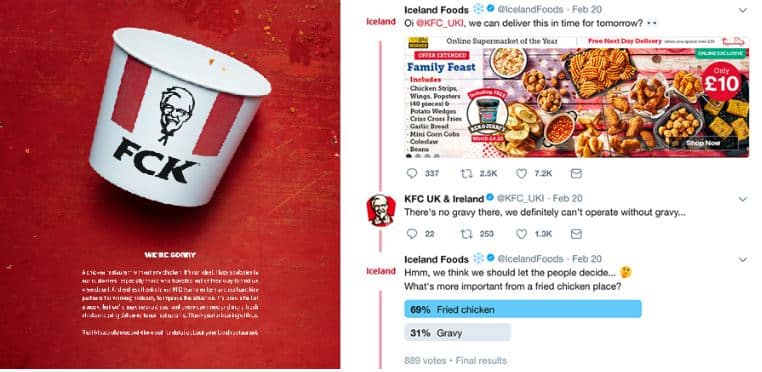
We all slip up sometimes, but let’s keep those mistakes out of our emails!
Have you ever opened an email that looked like a toddler got a hold of it?
We know clutter can be a total buzzkill. Picture this: a medley of fonts, a rainbow of colors, and as many call-to-action buttons as a carnival booth. Your eyes are left darting around as if trying to catch a squirrel!
Plus, forgetting to add alt text for images is like throwing a party and not inviting half your guests. Not everyone can see your stunning graphics, and they might be left scratching their heads.
And let’s not forget the desktop-only designs.
Remember the last time you tried to navigate a site optimally designed for a computer on your phone? Frustrating, right?
Now, we’ve also seen those emails that take the creative route too far.
One email we received recently was such an eyesore, it looked like it had been put together during a thunderstorm. The visual chaos left us more confused than when we try to use a vending machine for the first time!
Oh, and typos? We’ve all seen the infamous “we’re the best in the biness.” Honestly? Get it together, folks!
Sometimes, automation can spit out some wacky errors that just crack us up.
There was this one email filled with random symbols, like the “#” sign crashing the party. It sent us into an existential crisis pondering whether importance lies in random chaos.
Quick fixes:
- Stick to one or two fonts per email—less is more!
- Establish a clear hierarchy for headlines. Make it easy to read!
- Always add alt texts for images. Seriously, no one likes being left out.
- Test across multiple devices. Your email should look good everywhere.
We’ve all been there, but a clean and functional design is the golden ticket. After all, first impressions matter, and you want your brand coming across as polished and professional.
| Error Type | Description | Solution |
|---|---|---|
| Cluttered Design | Too many fonts and colors. | Limit to one or two fonts. |
| Lack of Alt Text | No descriptions for visuals. | Always include alt text. |
| Desktop Only | Ignores mobile users. | Test on different devices. |
| Typos | Errors that can confuse readers. | Proofread before sending! |
Let’s sharpen those designs and ensure our emails shine bright like a diamond! After all, nobody wants to feel like their email design went on the struggle bus.
Now we are going to talk about sprucing up our email designs without losing our minds over it. It doesn’t have to be a Herculean task!
Enhancing Your Email Design
We all know that crafting emails can often feel like pulling teeth. Believe us, we’ve been there, staring blankly at the screen, wondering why we can’t come up with something remotely appealing.
Then, one day at a coffee shop, we spotted a brilliant email from a brand that had nailed it. The design was so clean and inviting, we couldn’t help but open it up. We thought, “Hey, if they can do it, so can we!”
Here’s the scoop: there’s no need for a complete overhaul. Just sprinkle in some charm and practicality. Take a page from the playbook of brands that really hit the mark with their emails. Spending a little time on them can yield impressive results!
Here are some handy tips based on successful designs:
- Clear Subject Lines: Think of those curious moments when an enticing subject line grabs you. Use that same magic!
- Visual Hierarchy: Organize your content so it’s easy to scan—like opening a fridge and quickly spotting the ice cream! Just prioritize the bits that pop.
- Mobile Optimization: We live on our phones—a tiny masterpiece is a must to cater to those thumbs!
- Consistent Branding: Keep your colors and fonts aligned. It ensures recognition like a familiar jingle stuck in our heads.
- Call to Action: Make buttons vibrant and noticeable. You want folks to click, kind of like a toddler approaching a cookie jar!
As we piece together our email approach, we can audit what we’ve got. Is it shining like a diamond or more like a dusty old bookshelf?
It’s good to test things out! Different colors, styles, or formats can lead to jaw-dropping results—or at least a chuckle or two as things go sideways. Just imagine sending out a 90s-style email on a whim; it might shock people into reading it!
Design is a blend of expression and function; we might juggle visuals with text, but keeping it simple often steals the show.
So, embrace the quirks and finds that resonate with us. After all, if we can inspire someone to smile or click, we’ve done our job right, and that’s worth all the confetti we can throw!
Conclusion
Great email design isn’t just for fancy corporations; it’s for everyone. Remember, a well-crafted message can resonate with your audience, making them feel valued and appreciated. Experiment, have a little fun with your designs, and don’t be afraid to show your personality. You might just find that a simple tweak here and there transforms your emails from mundane to memorable. Now, throw on your designer hat, and let those creative juices flow. Here’s to brightening inboxes everywhere!
FAQ
-
What is the key to effective email design?
Effective email design conveys your message with creativity and charm, rather than relying solely on technology. -
How does a minimalist design impact metrics?
Minimalist designs often enhance click-through rates by guiding readers towards a single call-to-action and reducing distractions. -
What role does color play in email design?
Colorful designs can grab attention, reflect brand personality, and potentially boost open and click-through rates. -
What is a customer-centric approach in email design?
This approach personalizes content to resonate with recipients’ specific needs, enhancing loyalty and improving open and click-through rates. -
What is an eye-catching preheader?
A preheader is a short snippet that complements the email subject line, enticing readers to open the email and learn more. -
What should be included in an email footer?
Essential elements include contact information, social media links, legal disclaimers, and an unsubscribe button, among others. -
How can email signatures enhance communication?
Creative email signatures add personality and warmth, reassuring recipients that they’re engaging with real people. -
What are some secrets to successful email campaigns?
Focus on a single idea, use bold visuals, ensure mobile-friendliness, and feature prominent call-to-action buttons. -
What are common email design blunders to avoid?
Common blunders include cluttered designs, lack of alt text for images, mobile-unfriendly layouts, and typos. -
What are some tips to enhance email design?
Tips include using clear subject lines, organizing content with visual hierarchy, optimizing for mobile, and maintaining consistent branding.